Data Automation Rules
last updated on: Feb. 26, 2022
Introduction
Access Anywhere's Data Automation Rules deliver if-this-then-that functionality for automatically taking actions when certain types of events happen on Access Anywhere.
Each Data Automation Rule configured in Access Anywhere consists of an event trigger (e.g. "File is uploaded") which triggers one or more configurable actions (e.g. "Transcode video file" or "Perform content intelligence").
See Also:
Administration
The Data Automation Rules configuration page is accessed from the Organization menu by the organization administrator and by users with the Administrator role.
Event Types
This section outlines the available Event Types that Access Anywhere supports.
1. File is uploaded through this platform
Description: This event is triggered when a file is uploaded by a user directly on Access Anywhere. The scope of this upload can be narrowed using the Folder selector.
Available since: 2106.00
2. File is discovered on storage
Description: This event is triggered when a file is discovered directly on a storage platform under the management of Access Anywhere. A file will be discovered when a Provider Re-sync, Cloud Refresh or Deep Cloud Refresh is performed; this event type does not trigger the 'automatic discovery' of files or folders. The scope of this upload can be narrowed using the Folder selector.
Available since: 2106.00
3. File is discovered on storage or uploaded
Description: This event is the union of Event Types 1 and 2.
Available since: 2106.00
4. File contains matches against Content Discovery Rules
Description: This event is triggered when a file has been scanned using the Content Discovery rules, and the scan results contain one or more matches against the Content Discovery rules. Each rule applies to a single Content Detection Category which must be selected when setting up the rule.
Available since: 1906.00
Action Types
Each action type is available only for the event types listed at the end of the action type's description.
1. Copy file to another folder
This action copies the file that triggered the event to a designated folder. The designated folder can be selected using the folder selector control. The Copy operation will be performed as a Background Task assigned to the Admin user.
Note that the folder path is not preserved during the copy operation to the designated folder.
Supported Events: #1, #2, #3, #4
Available since: 1906.00
2. Perform Content Intelligence
This action sends the file that triggered the event to the Content Intelligence module for analysis. The Content Intelligence extractors that are enabled at the time of the event will be executed for the file. The process of Content Intelligence will be executed via a Background Task and will be performed as per the systems Task scheduling.
Supported Events: #1, #2, #3
Available since: 2006.00
3. Transcode file
This action sends the file that triggered the event to be transcoded using Access Anywhere's transcoding capabilities. When configuring this event type, you are required to select the Transcoding Preset you wish the file to be transcoded into.
To use the transcode file rule you will need to enable "Video transcoding" through the Organization > Content Intelligence page.
Supported Events: #1, #2, #3
Available since: 2106.00
4. Send email to an email address
This action allows the event to notify a single email address when a qualifying event is triggered. The email address is specified during the configuration of the action.
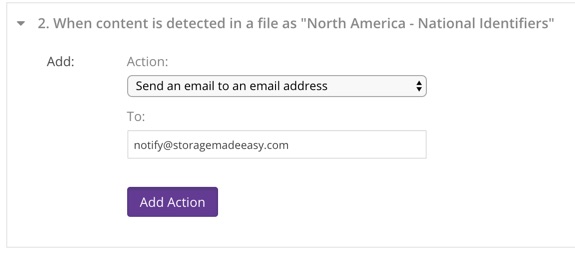
Supported Events: #4
Available since: 1906.00
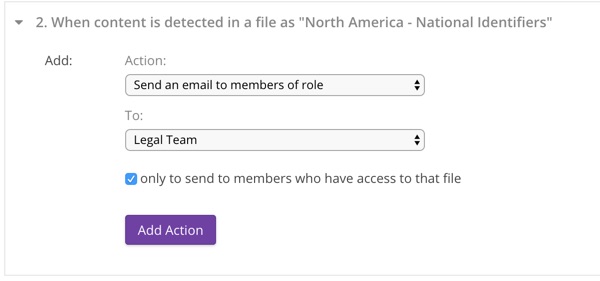
5. Send email to members who have a role
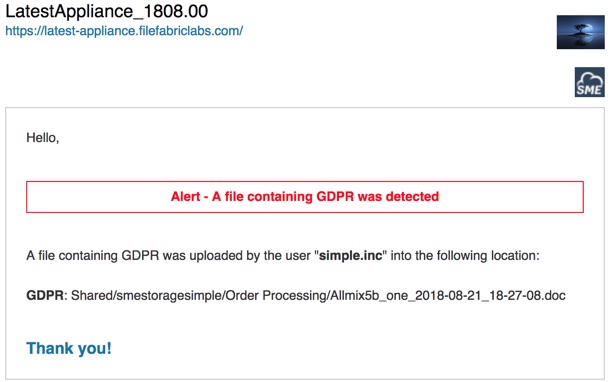
This action sends a notification of the triggering event by email to organization members who have the specified role. When configuring the action you must select the role from the dropdown, as well as whether the notification should only be sent to members of that role that have permissions to access the file that triggered the event, or to all members with the role regardless of their permissions.
An email like the following will be sent when matching content is detected:
Supported Events: #4
Available since: 1906.00
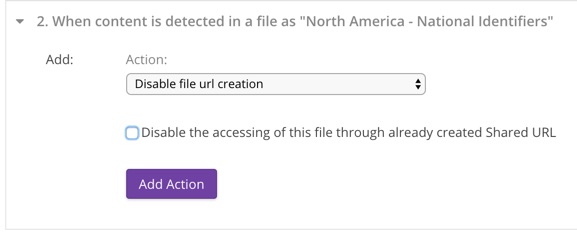
6. Disable file URL creation
This action prevents the file from being shared through the creation of secure shared links. This action can also be configured to disable existing shared links.
Supported Events: #4
Available since: 1906.00
7. Move file to another folder
This action moves files matched by Content Detection to a nominated folder. This could be used to quarantine files that may contain sensitive data, or to classify files by location (folder) based on specific content. Only one move to folder action is allowed per Content Detection Category per rule.
Configuration
- Choose a folder from the dialog (folder must exist or can be created from dialog)
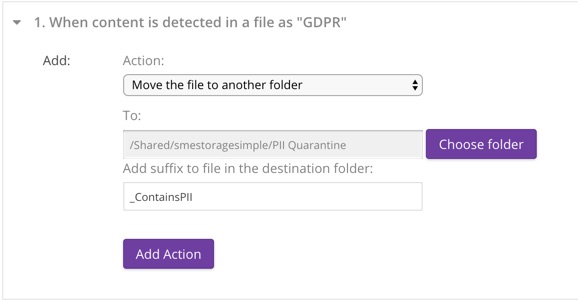
A suffix is added to the file as it is moved which includes the date and time. This prevents subsequent updates from overwriting the quarantined version. An additional optional suffix may also be added. File extensions are preserved.
For example, with a provided suffix of "_ContainsSSN" the new name for:
CreditApplication.pdf
would be:
CreditApplication_ContainsSSN_2018-08-20_22-08-24.pdf
Supported Events: #4
Available since: 1906.00
8. Call webhook
This action causes Access Anywhere to invoke an HTTP callback when a qualifying event occurs. The Access Anywhere customer using this option is responsible for providing the callback implementation at the URL configured for the action in the rule, and for ensuring that the URL is reachable by Access Anywhere.
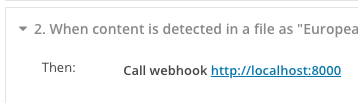
The Access Anywhere invokes the callback with the HTTP POST request method. The callback is invoked once per file for which a qualifying event is detected.
The HTTP request will contain a User-Agent header et to the site title of Access Anywhere sending the HTTP request followed by Access Anywhere version, for example: “NAA Appliance 2106.00“. It will also contain a Content-Type header set to “application/json”.
The request body is a JSON representation of information about the file in which the qualifying content was discovered and about the event that caused the webhook to be called. Here is an example:
{
   "type":"content_detected",
   "date":"2021-06-15 08:51:22",
   "data":{
      "file":{
         "fi_id":"134378721",
         "pii_detected_metaids":[
            "119",
            "118"
         ],
         "pii_unset_metaids":[
            "46",
            "129",
            "130"
         ],
         "had_before_pii":{
            "119":0,
            "46":null,
            "118":0,
            "129":null,
            "130":null
         }
      },
      "filepath":"Amazon S3 files (content indexing)/Sweden - Passport.txt",
      "action":{
         "ev_id":"59",
         "ev_orgid":"3623",
         "ev_type":"content_detection",
         "ev_param":"118",
         "ev_created":"2021-06-14 08:53:52",
         "ac_id":"136",
         "ac_evid":"59",
         "ac_orgid":"3623",
         "ac_type":"webhook",
         "ac_param":"https://dev.filefabriclabs.com",
         "ac_param2":"",
         "ac_created":"2021-06-14 08:54:07"
      }
   }
}
Webhook invocations by Access Anywhere will timeout if a connection cannot be established with the webhook host within 3 seconds, or if the first byte of the reply is not received within 30 seconds after the connection is established. The rule that invoked the webhook will pause until the response is received or a timeout has occurred.
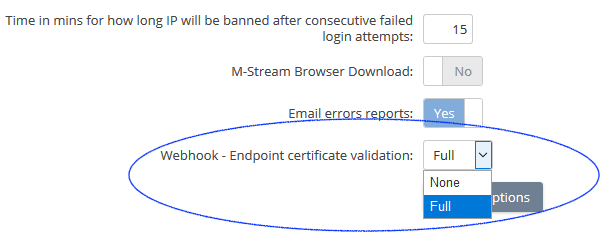
At the discretion of the implementor, webhooks can be accessed using HTTP or HTTPS. The URL's protocol component should indicate the correct method of access. When HTTPS is used Access Anywhere will the SSL certificate provided by the webhook host if validation is turned on in Site Functionality.
Supported Events: #4