Configuring Docker Network Ranges
Docker containers are included as part of the base configuration. The docker networking starts creating networks in the 172.16.X.X/16 range and continues in this range. However, the 172.16.X.X range is a common network used in enterprises, and as such may conflict with already established networks.
Private Address Ranges
The following ranges are reserved for private networking:
192.168.0.0 - 192.168.255.255  (192.168.0.0/16)
 172.16.0.0 - 172.31.255.255   (172.16.0.0/12)
   10.0.0.0 - 10.255.255.255   (10.0.0.0/8)
Setting the Container Network Range
To change Docker from using the 172.16.X.X to 172.31.X.X range perform the following: - Login to appliance as smeconfiguser - Become root
- Create/Edit the following file with your favorite editor: - Insert the following code into daemon.json. Adjust the network ranges to suit the environment. This example will allow docker to use the 10.219.X.X range creating individual networks with up to 256 IPv4 addresses.Restarting with the New Range
Once the steps above are complete, the appliance will need to be rebooted with the docker containers shutdown.
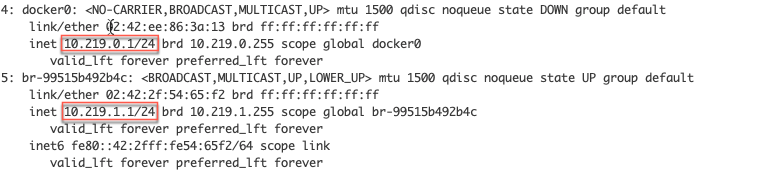
After the reboot is complete. Run the following to start the containers again and verify the network ranges. Below is an example of the output fromip a