Filebox
FileBox is a way to for users to add emails and attachments to a nominated storage cloud just by CC''ing or Bcc'ing an email to a unique Access Anywhere FileBox address.
1 Filebox: Instantly sharing files to folders from email
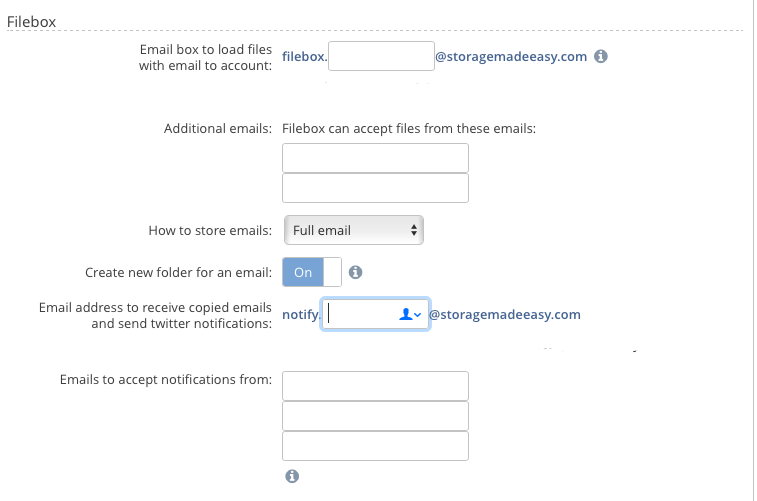
Filebox works as follows:
-
All users have a Filebox setting in their Dashboard page.
-
Each FileBox address requires a unique keyword. You can use the default or assign your own keyword to the filebox@example.com / filebox@yourNAA domain.com email address so that the end email address become filebox.
@storagemadeeasy.com / filebox.@yourNAA domain.com . -
This keyword becomes a unique address to send or forward an email. All emails that are received to this address that are sent from your registered Access Anywhere email address will be added to a smart folder called “My FileBox”
-
You can configure whether just to store emails or emails and attachments.
-
Within the Filebox folder the subject line of the email will become a folder name. The email, will be stored as a text file, with any attachments if this is the configuration you chose.
%%Note%% You must send the emails from the email address that you registered with Access Anywhere for the emails to be picked up%%%% (if you want to add more email addresses you can do this from Cloud Add-In's**)
%%Note%% FileBox emails are processed every 5 minutes so it may take 5 to 10 minutes for the email to appear in your FileBox
2 FileBox for Team users
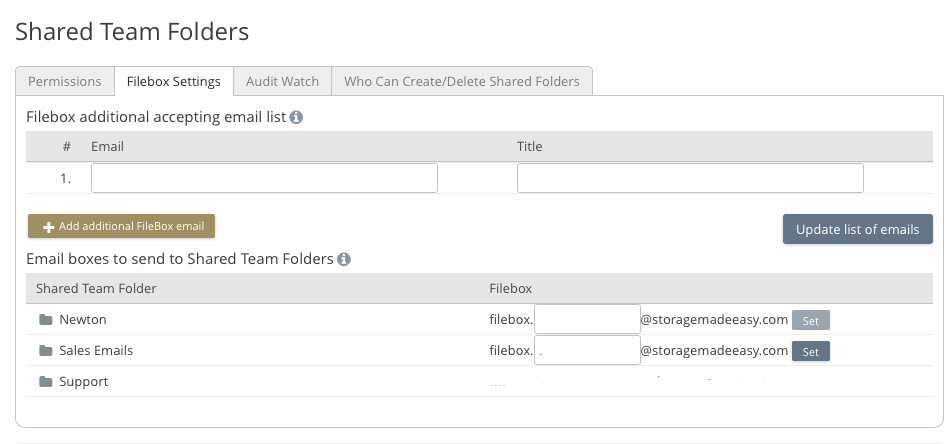
Each shared folder that is created as part of a Cloud File Server also has a unique email address.
The administrator of the Cloud File Server needs to assign the FileBox unique names and distribute them to users.