CloudDAV (WebDAV Protocol)
Last updated on April 14th, 2021
Enabling and Configuring CloudDAV
CloudDAV is Access Anywhere implementation of WebDAV with a unique twist, it works over any Storage Cloud mapped to a Access Anywhere account whether that Storage Cloud is WebDAV enabled or not.
This is made possible by the protocol adaptors that Access Anywhere provides to enable public and private storage cloud to be accessible over common protocols.
Authentication: Your Access Anywhere username or password
You can use a variety of WebDAV clients or Apps to access Files using CloudDAV.
Example of Apps include:
iOS Apps: Pages, Numbers, Keynote, OmniFocus, OmniGraffle, OmniGraphSketcher, WPS Office + others
Android Apps: WPS Office, WebDAV Navigator, X-plore file manager, Total Commander + others
CloudDAV Options
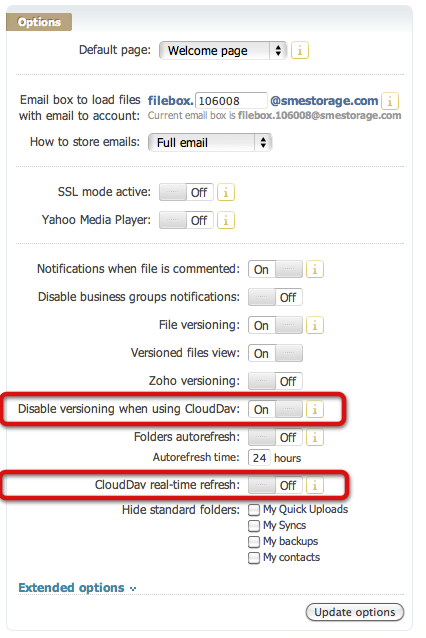 There are two options available to be set after login to Access Anywhere and visiting the "My DashBoard" link on the right sidebar.
The first option is whether to disable file versioning if using CloudDAV. By default this will be set to "on". When creating or editing files this stops previous version being kept and versioned.
The second option is whether to always update, on access, Access Anywhere cache when viewing files over CloudDAV. This means that Access Anywhere will always check directly with the Clouds that you are using rather than using the cache. This has the advantage that you will always see any new files that you added direct to these Clouds but has the disadvantage that it could be slower on the initial view of each directory.
Things to Note
WebDAV client programs, especially Windows clients, often require tuning of their configurations to work as expected with WebDAV servers such as CloudDAV. The configuration requirements vary depending on the client software as well as the operating system version and sometimes other factors.
If you added files externally to your Cloud Storage and you cannot see them via CloudDAV then you either need to enable the CloudDAV real-time refresh from the CloudDAV options available from your Cloud Dashboard on the website, or you need to do a manual refresh of your Cloud Files Cache.
Access Anywhere Encrypted files that are uploaded where the end user holds the encryption key (ie. not stored in Access Anywhere) are not displayed from a WebDAV client connection as it makes no sense to show them as they cannot be un-encrypted from a standard WebDAV client.
Also note that in corporate environments WebDAV can be disabled at a policy level. In the following registry keys:
HKEY_LOCAL_MACHINE\SYSTEM\CurrentControlSet\Control\NetworkProvider\HwOrder\ProviderOrder

HKLM\SYSTEM\CurrentControlSet\Control\NetworkProvider\Order\ProviderOrder
the value ",webclient" must be at the end of the value in the key. If it is not then WebDAV is restricted at an OS level and will not work. Adding the value back may resolve the issue.
If you are using an Amazon WorkSpaces Windows 10 Server instance then WebDAV is not enabled by default. You need to enable 'WebDAV Redirector' in Features and restart WorkSpaces to be able to work with WebDav.
CloudDAV is not supported for use with Mac OS X Finder's "add server" feature and CloudDAV will reject attempts by Finder to connect.
TLS Support
The Access Anywhere no longer supports TLS v1.0 and now only support TLS v1.1 and TLS v1.2. This change is in keeping up with the compliance requirements of PCI DSS regarding acceptable encryption.
Windows 7 did not ship with support for TLS v1.1 or TLS v1.2, whereas Windows 10 does. Microsoft does have an article on patching this issue:
https://support.microsoft.com/en-us/help/3140245/update-to-enable-tls-1-1-and-tls-1-2-as-a-default-secure-protocols-in
Note that we do not test or support our software on Windows 7. The information about Windows 7 is provided on an 'as-is' basis.
Pre-Requisite for Enterprise Appliance: CloudDAV is configured and turned on at a package level